Email deliverability
Cold Email Deliverability in 2026: 7 Checkpoints
Follow one cold email from send to reply through the seven checkpoints that decide its fate, using the current Gmail, Yahoo and Outlook sender rules.
 ReacherPro Team · 10 min read
On this page · 15
A cold email does not fail in one place. It can be stopped by a dead address, a missing DNS record, a mailbox that went from zero to two hundred overnight, or three people who pressed "report spam" on a Tuesday. From the sender's side, all of those look exactly the same: nobody replied.
So instead of another list of tips, this guide follows one email along its route. There are seven checkpoints. At each one you will see what is being asked, how an email gets stopped there, and how to check yours in about a minute.
Before you set off: which rules actually apply
Most advice treats the 2024 Gmail and Yahoo rules as one checklist for everybody. The real picture depends on where your email lands and how much you send, and for B2B teams it holds a surprise.
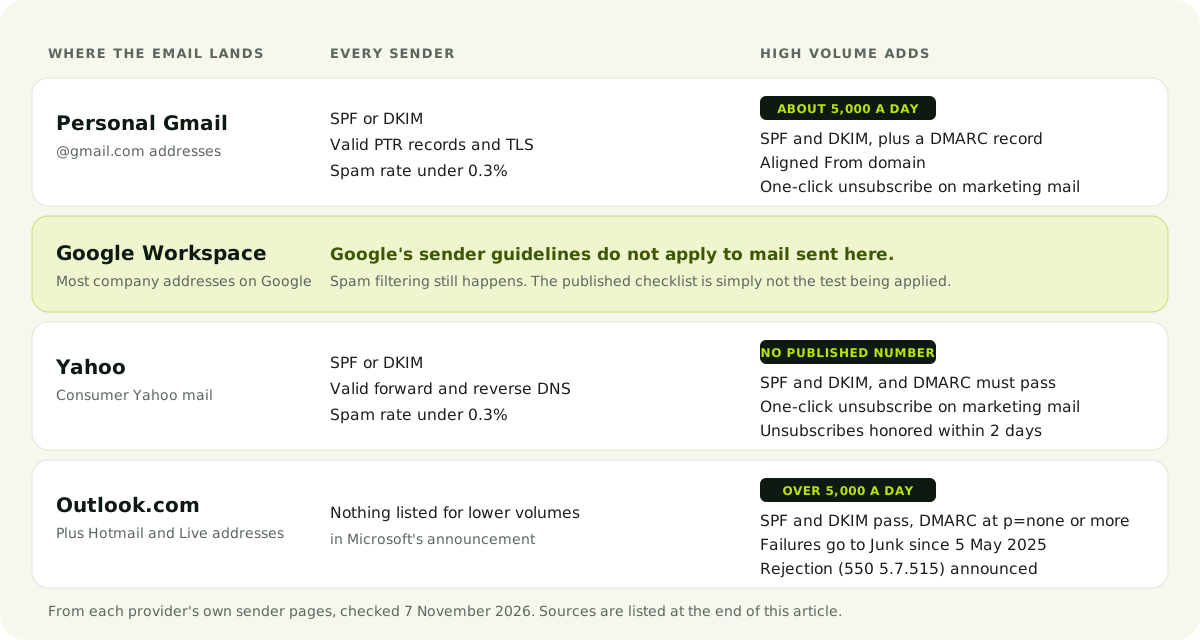
Three details change how you should read that grid:
- Google's guidelines are about personal Gmail. Google says they don't apply to messages sent to Google Workspace accounts. That does not make company inboxes easy, since spam filtering still runs. It does mean "we meet the Gmail rules" is no proof of reaching a business inbox.
- The 5,000 is counted across your domain, and it sticks. All mail from one primary domain counts together, subdomains included, and a sender that crosses the line once is permanently treated as a bulk sender.
- Enforcement has moved on. Google says it began ramping up enforcement in November 2025. Microsoft has routed failing high-volume mail to Junk since 5 May 2025 and has announced rejection with error
550 5.7.515, without a published date.
Now the route itself.
Checkpoint 1: The list
The question: is there a real person's inbox at this address?
How it stops you: the email bounces, and a pattern of bounces tells providers you do not know who you are writing to. In Saleshandy's 2026 data, bad addresses bounced almost nine times as often as valid ones.
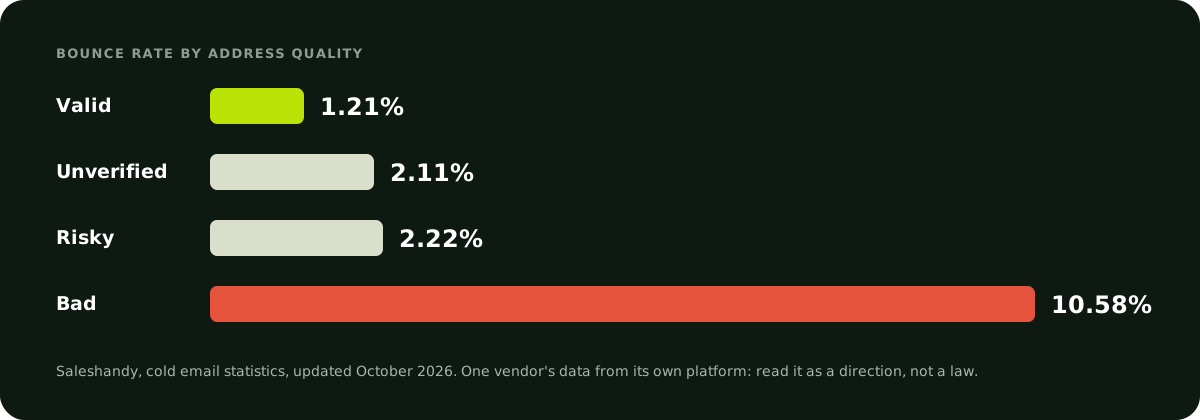
Check it in a minute: look at the bounce count on your last campaign. Then run the next list through an email verifier before it goes anywhere near a sequence.
One bounce should also be the end of that address. In ReacherPro, an address that has bounced is skipped by every later email step, so a dead address is not retried by the next campaign.
Checkpoint 2: Identity
The question: did this domain really send this, and did it arrive unaltered?
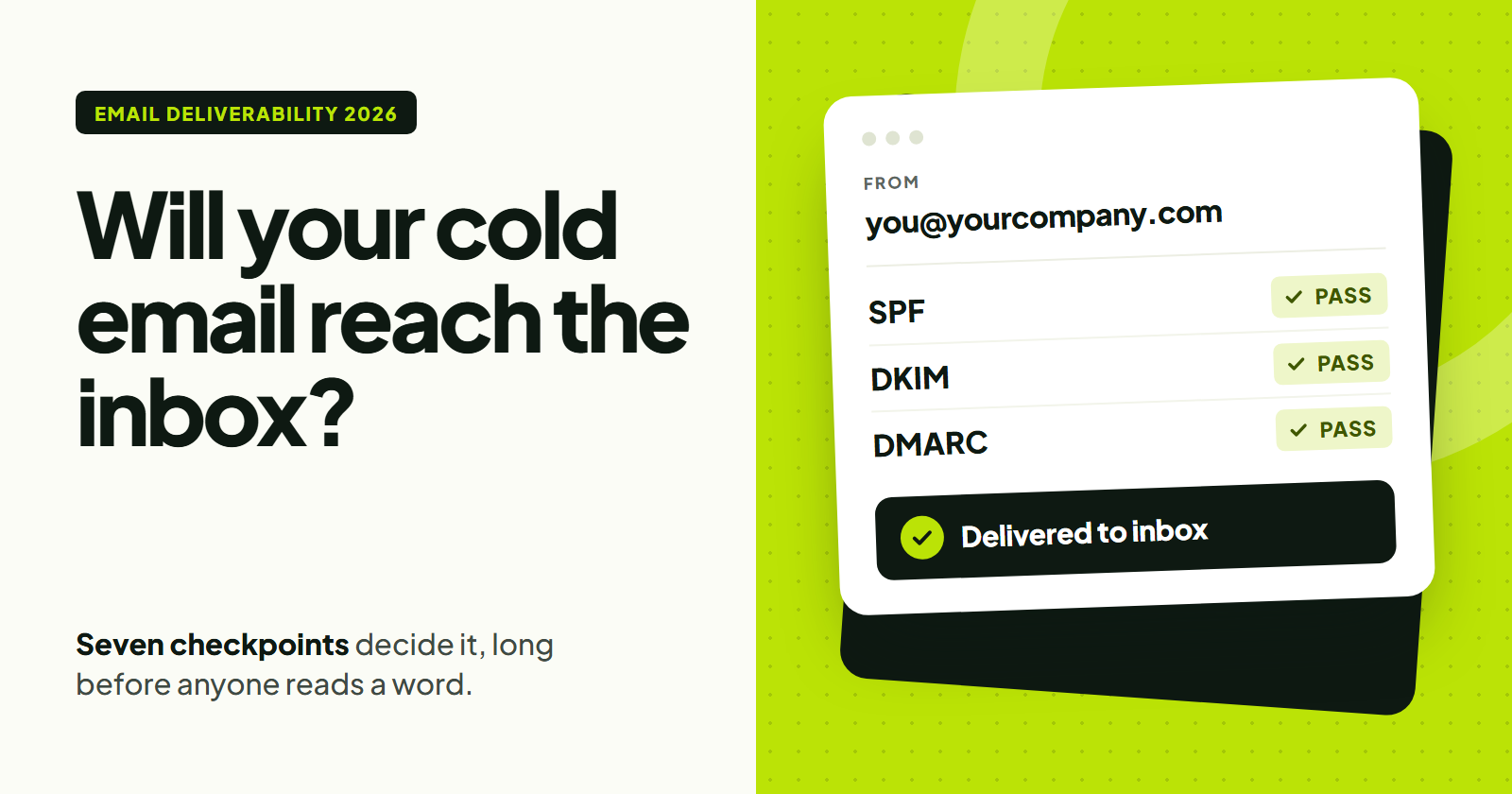
How it stops you: Google says mail that isn't authenticated might be marked as spam or rejected with a 5.7.26 error. This applies at any volume: every sender writing to personal Gmail needs at least SPF or DKIM. Set up both, because high-volume senders must have both and a Gmail DKIM key must be 1024 bits or longer.
Check it in a minute: send a message to a Gmail address you own, open it, and choose Show original. You want PASS beside both SPF and DKIM.
Checkpoint 3: Alignment
The question: is the domain your reader sees the same one that passed the check?
How it stops you: this is the checkpoint people miss, because SPF and DKIM can both pass and the email can still fail. If a tool signs as its own domain while your From address shows yours, the two checks are valid but prove nothing about you.
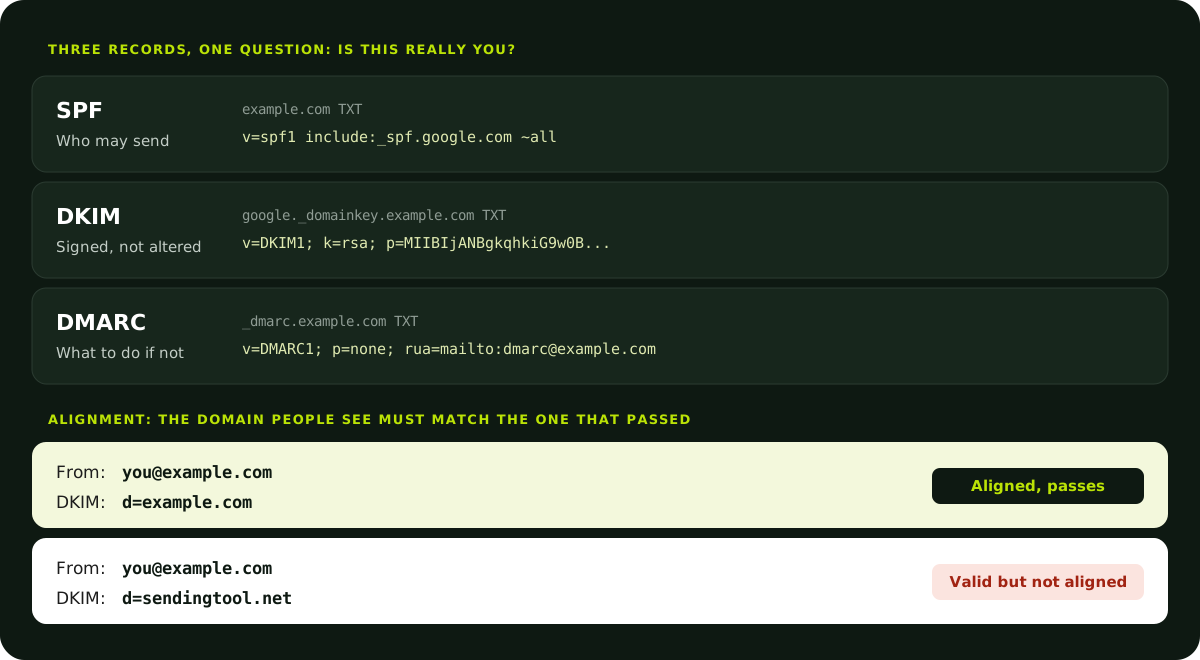
Google requires high-volume senders to have the From domain aligned with either the SPF or the DKIM domain, and a DMARC record, where p=none is enough to qualify. Yahoo says the same, and adds that DMARC must pass.
Check it in a minute: in the same Show original view, look for DMARC: PASS. If there is no DMARC record yet, publish one with p=none, read the reports it sends for a few weeks, and only then consider a stricter policy. Jumping straight to p=reject can block your own invoices and calendar invites if some system was never set up to sign correctly.
Checkpoint 4: Pace
The question: does this mailbox behave the way a real person's does?
How it stops you: a new address that suddenly sends hundreds of near-identical emails looks like what it is. Volume is something a mailbox earns over time, and there is no published number for how fast, so the safe approach is simply gradual.
Check it in a minute: add up what each mailbox sends across all campaigns, not one. Two campaigns with sensible limits can still double a mailbox's real volume.
ReacherPro handles this at the mailbox rather than the campaign. A new mailbox starts at 5 emails a day and climbs in a straight line to a cap of 50 by day 15, and that cap is shared by every campaign using it. This is pacing, not a warm-up network: it controls how much you send and does not exchange mail with other inboxes.
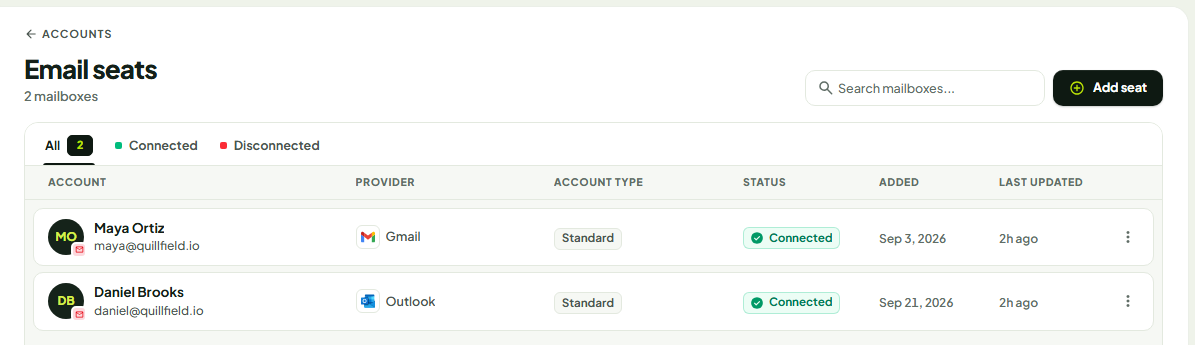
If you need more volume, add mailboxes rather than pushing one harder, and remember Google counts them together by primary domain.
Checkpoint 5: The message
The question: would this person be glad, or at least not annoyed, to have received it?
How it stops you: providers do not publish a list of banned words, so ignore anyone selling one. The practical risk is a message that reads like a broadcast. Those get ignored or reported, and reports are what the next checkpoint measures.
Write to one person. Say why you picked them, in a line that could not be pasted into anybody else's email. Ask one small question. Keep links and images to what the email really needs, and make it obvious how to tell you to stop.
Check it in a minute: read your opening line and ask whether it would still make sense sent to a stranger at another company. If so, it isn't personal yet. For a closer look at wording, the same test works on LinkedIn connection notes.
Checkpoint 6: The reaction
The question: how many people pressed "report spam"?
How it stops you: this is the number providers publish a limit for. Google asks senders to stay below 0.10% and never reach 0.30%. Yahoo's limit is also 0.3%. These are tiny rates, and it takes very few people to move them.
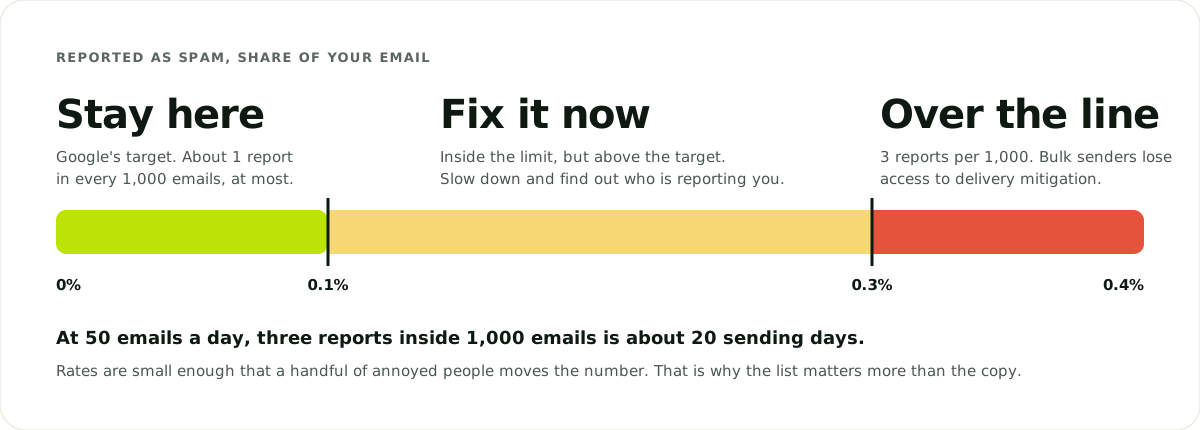
Check it in a minute: connect your domain to Google Postmaster Tools and look at the spam rate. Low-volume domains may see little or no data there, so also treat every "stop emailing me" reply as a signal and add that person to your do-not-contact list straight away.
Stopping on time matters here too. Someone who has already replied and still gets your second follow-up has every reason to report you. ReacherPro checks for a reply again right before each outreach step, and stops if one has arrived.
Checkpoint 7: The reply
The question: did a human answer?
This is the only measurement left that you can fully trust. Open rates are not it: Instantly calls them unreliable in 2026, since Apple Mail preloads tracking pixels whether or not anybody reads the email.
For a rough benchmark, the same report puts the average reply rate at 3.43%, with the top quartile at 5.5%. Other vendors publish different figures from different customers, so compare yourself with your own last campaign first. Instantly also finds 58% of replies arrive on the first email, which leaves a large share for follow-ups. Sequences that use both LinkedIn and email get extra chances to start the conversation.
Reading the route backwards
When a campaign goes quiet, do not start by rewriting the copy. Start from what you can see and walk back to the checkpoint that explains it.
Lots of bounces? Checkpoint 1. Stop sending and clean the list.
Rejections quoting 5.7.26 or 5.7.515? Checkpoints 2 and 3. It is your DNS records, and no amount of better writing will fix them.
A mailbox that worked and then faded? Checkpoint 4 first, then 6. See whether volume rose before replies fell.
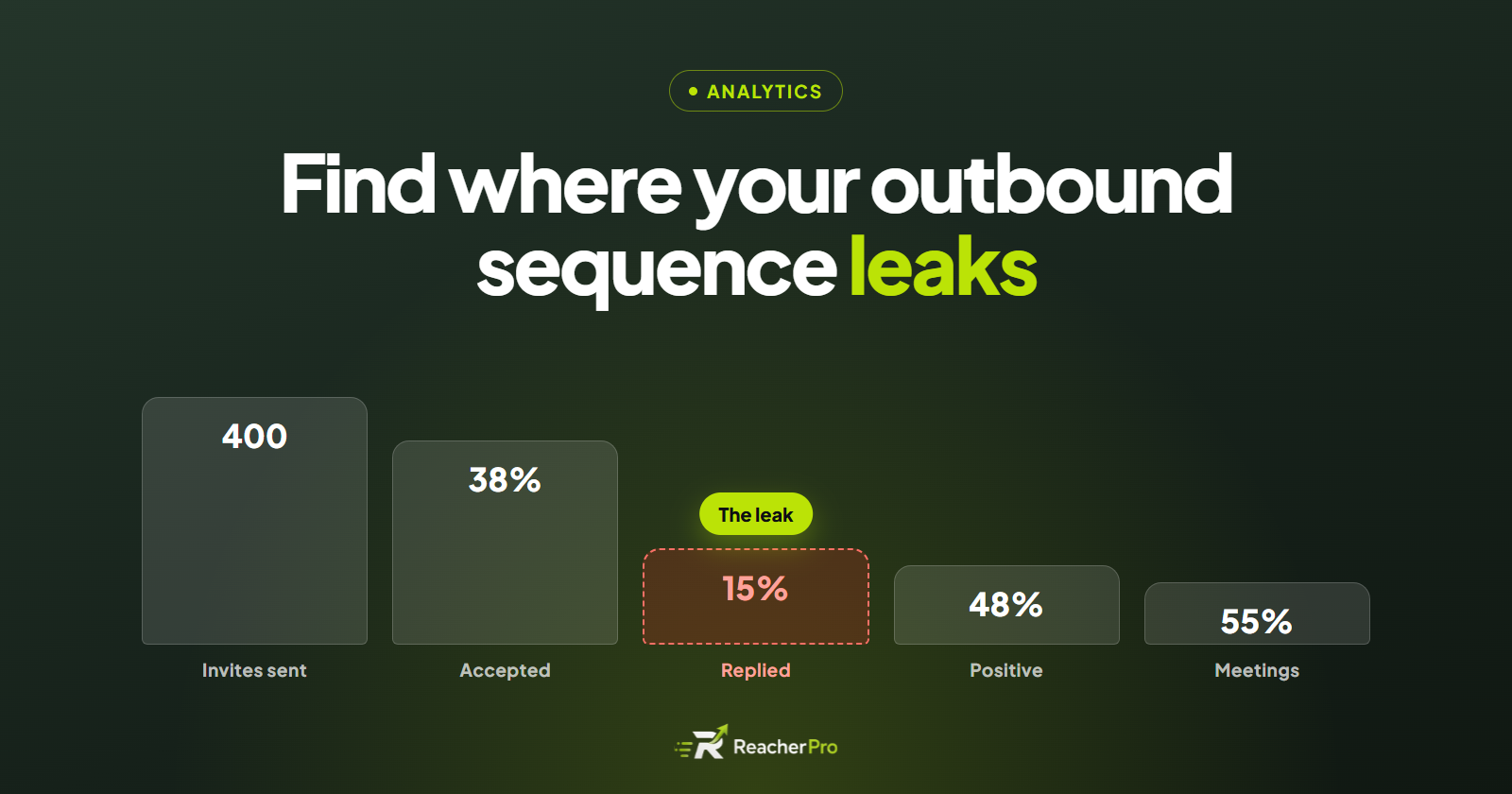
Delivered, no bounces, still no replies? Checkpoint 5, or the list itself: the right email to the wrong people is silent too. Reading each step of your funnel shows you where people drop away.
Replies arriving, but angry ones? Checkpoint 6. Pause and fix targeting before those people find the spam button.
Questions people ask
Do these rules apply if I send only 50 emails a day?
Partly. The high-volume rules start at about 5,000 a day, but the "every sender" rules apply to anyone writing to personal Gmail or Yahoo addresses, whatever the volume: authentication, valid DNS and a spam rate under 0.3%.
Does cold email need a one-click unsubscribe?
Google and Yahoo require it from bulk senders on marketing and subscribed mail, using the List-Unsubscribe and List-Unsubscribe-Post headers, with requests honored within about two days. Below that volume, the provider rules do not demand the header, but always give people a clear way out. Laws such as CAN-SPAM and GDPR set their own rules separately, so check what applies to you. This guide isn't legal advice.
Should I send cold email from my main domain?
Your domain's reputation is shared by everything sent from it, including invoices and customer mail. Many teams use a separate, clearly related domain for outbound to limit that risk. It still needs its own SPF, DKIM and DMARC records and its own slow start. Just remember that subdomains count toward your primary domain's total at Google.
Your next step
Pick one mailbox and open your last sent email with Show original. Those three lines, SPF, DKIM and DMARC, take less than a minute to read and settle checkpoints 2 and 3 on the spot.
When the foundations pass, the rest is discipline, and that is the part software can hold steady for you. See how ReacherPro runs email outreach with per-mailbox pacing, bounce skipping and stop-on-reply built in.
Sources
Rules and thresholds were checked against these pages on 7 November 2026. Providers change them, so confirm anything critical at the source.