Why ReacherPro

Getting new clients shouldn't take this much manual work.

Lists in one tab, messages in another, follow-ups on sticky notes. ReacherPro does the SDR legwork on LinkedIn and email, so your team spends its time on conversations.

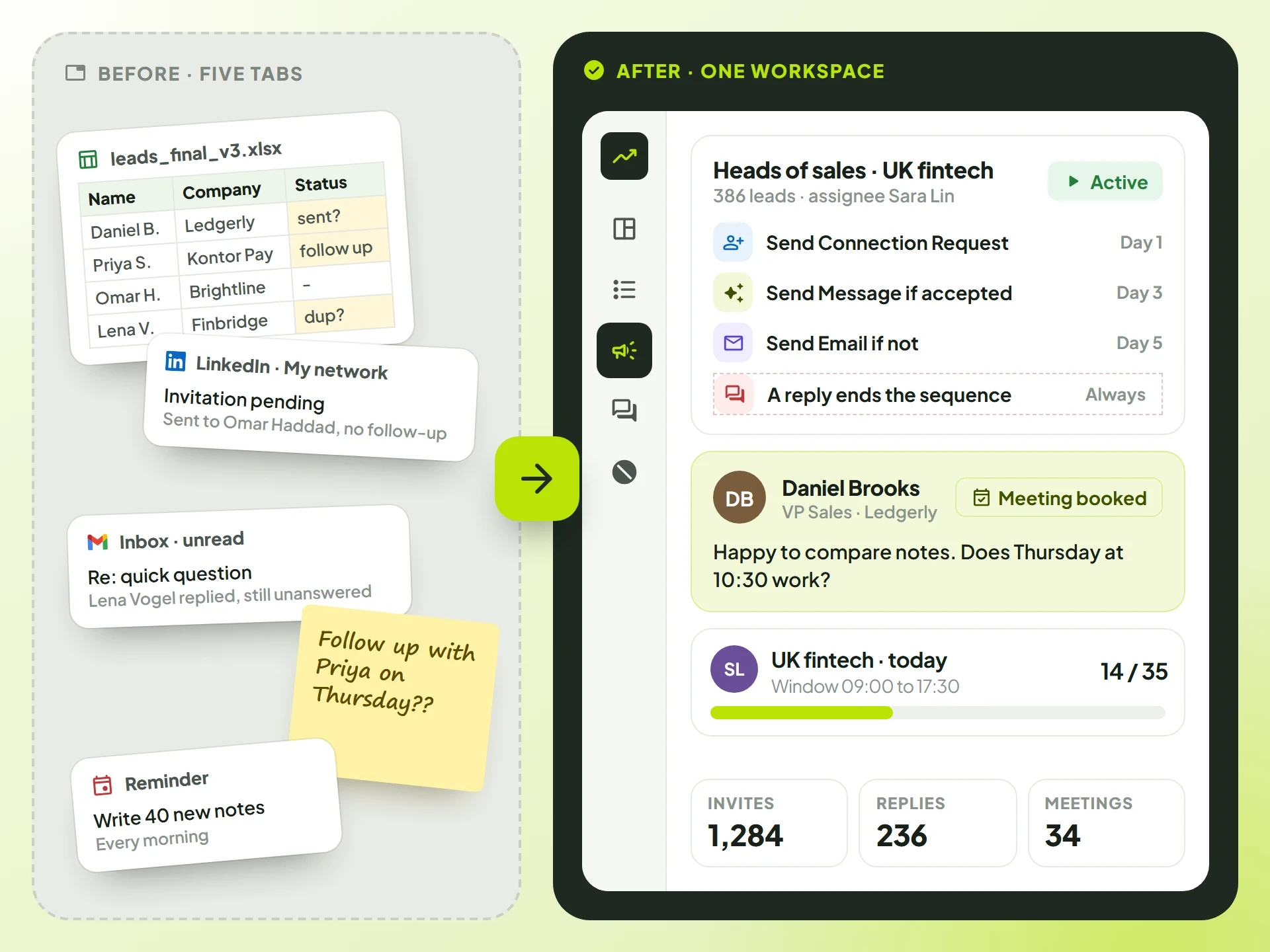
Before: a spreadsheet, a LinkedIn tab, an inbox, a sticky note and a reminder. After: one ReacherPro workspace with a running campaign, a reply with a meeting booked and the results.

The problems we fix

Six reasons outbound eats your week.

Each one is a job an SDR does by hand today. Here is what ReacherPro does instead.

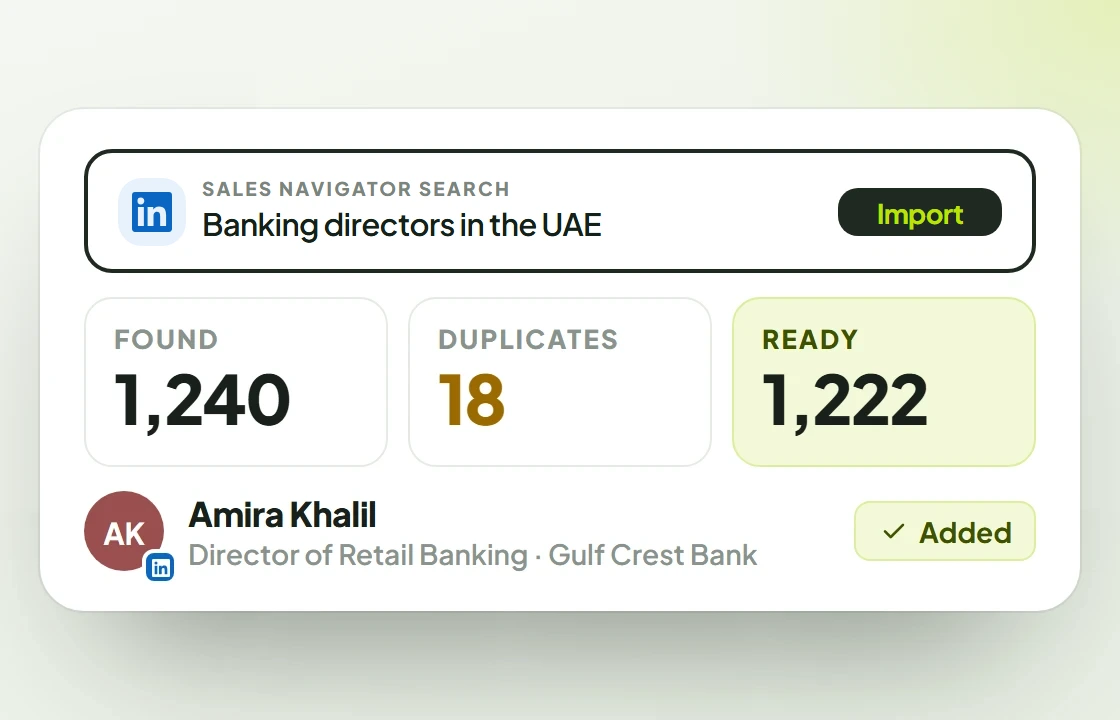
  1. A lead list from one Sales Navigator search for banking directors in the UAE: 1,240 found, 18 duplicates skipped, 1,222 ready.01

    The problem

    Finding the right people takes hours.

    With ReacherPro

    Paste a LinkedIn or Sales Navigator search and ReacherPro builds the lead list for you. Or bring a CSV you already have.

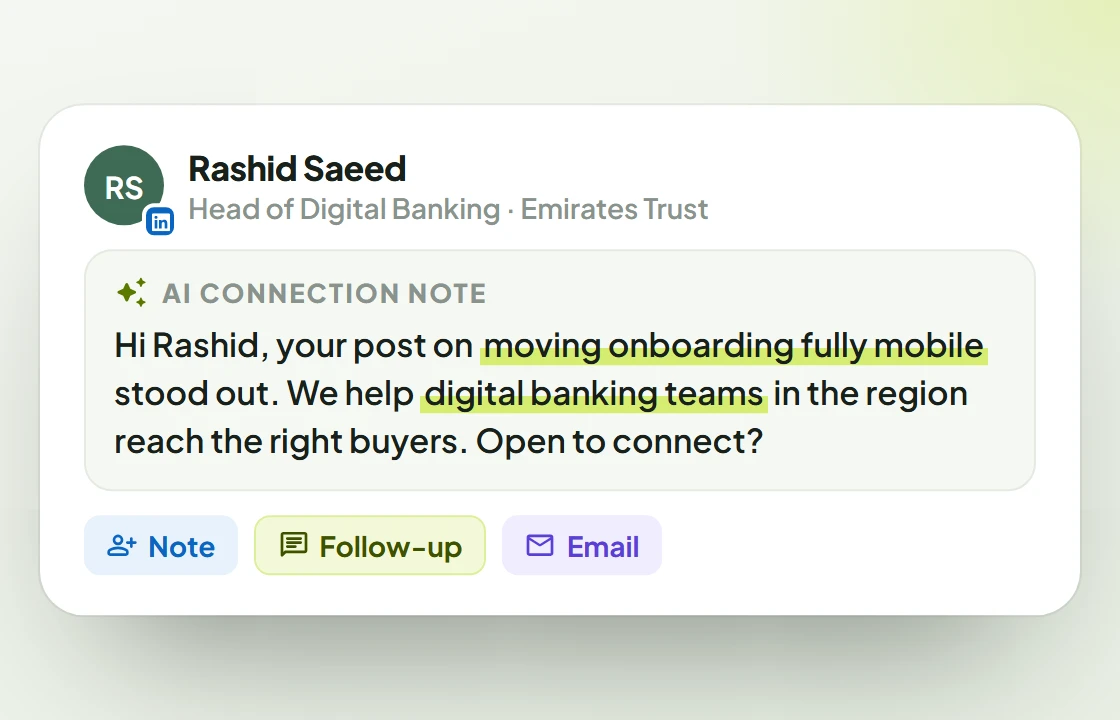
  2. An AI connection note for Rashid Saeed, with the phrases taken from his profile highlighted.02

    The problem

    Writing personal messages doesn't scale.

    With ReacherPro

    The AI writes each connection note, follow-up and email from that prospect's own profile. No template with a name swapped in.

    Need one email out now? Instant email writes and sends it without building a sequence.

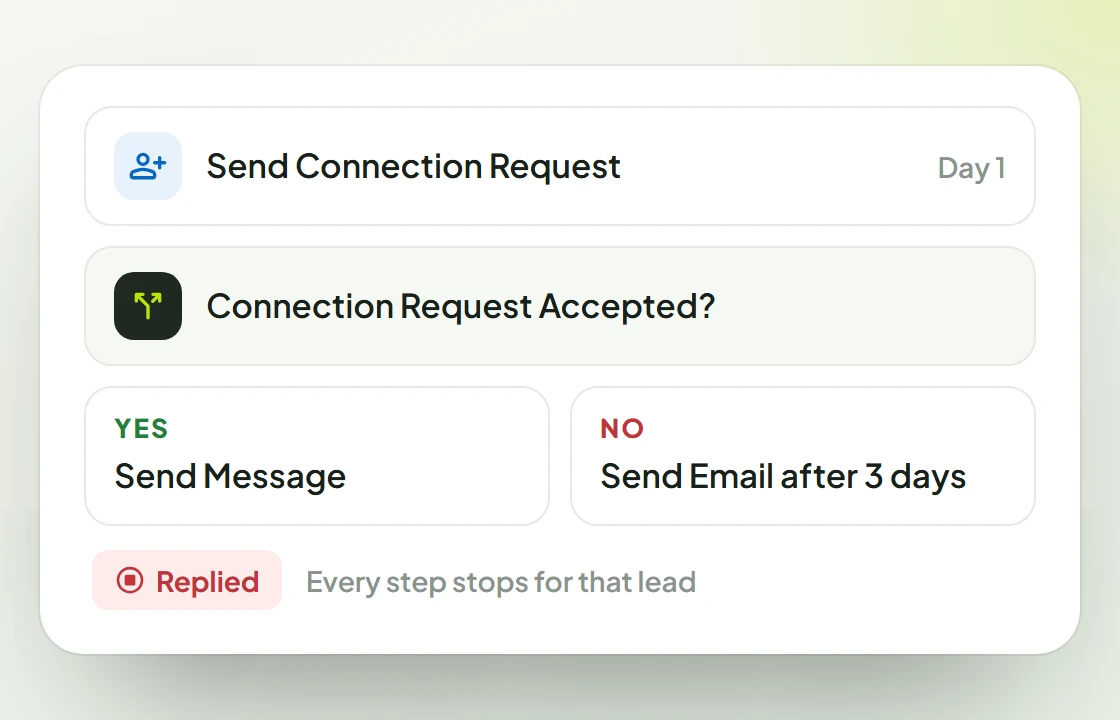
  3. A branching sequence: Send Connection Request, then Connection Request Accepted? leads to Send Message or, after three days, Send Email; a reply stops the follow-ups for that lead.03

    The problem

    Follow-ups slip through the cracks.

    With ReacherPro

    Branching LinkedIn and email sequences follow up on schedule, and the follow-ups stop the moment a lead replies.

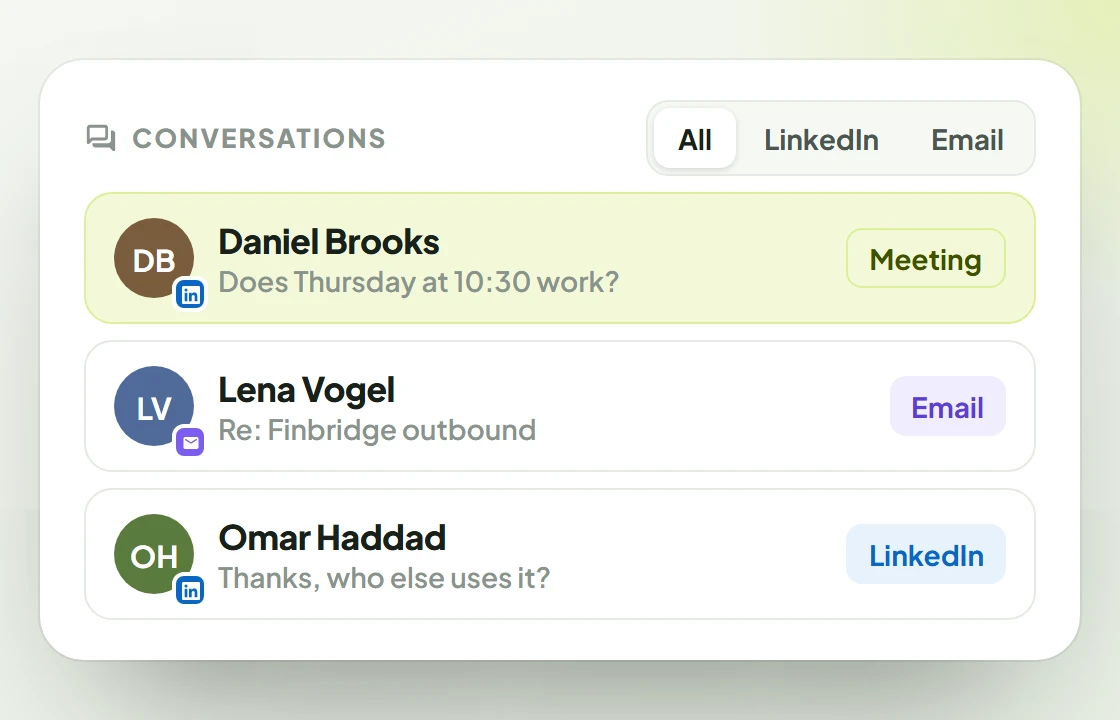
  4. The Conversations inbox with LinkedIn and email replies side by side.04

    The problem

    Replies are scattered across LinkedIn and inboxes.

    With ReacherPro

    LinkedIn messages and email replies from every seat land in one Conversations inbox, filtered by channel.

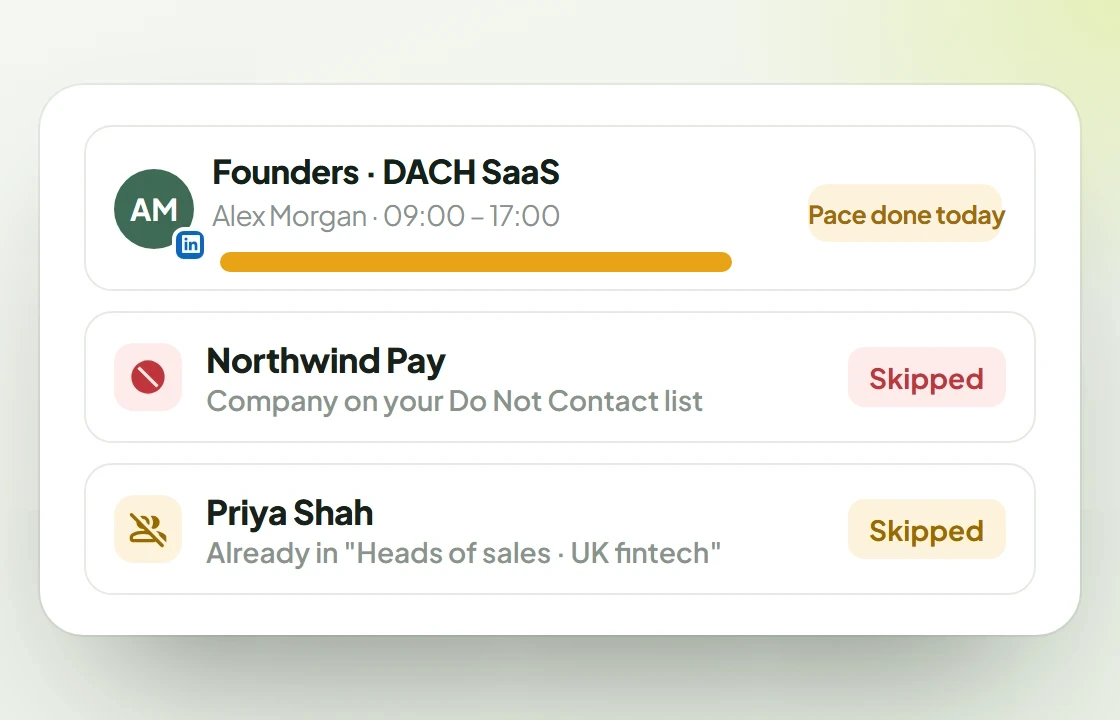
  5. Safety controls: a campaign whose daily pace is done for today, a company on the Do Not Contact list and a lead already in another campaign, both skipped.05

    The problem

    Fear of restricted accounts, or of annoying people.

    With ReacherPro

    A daily pace and send window on every campaign, mailboxes that warm up on their own, a duplicate guard across campaigns and a Do Not Contact list for people, companies and domains.

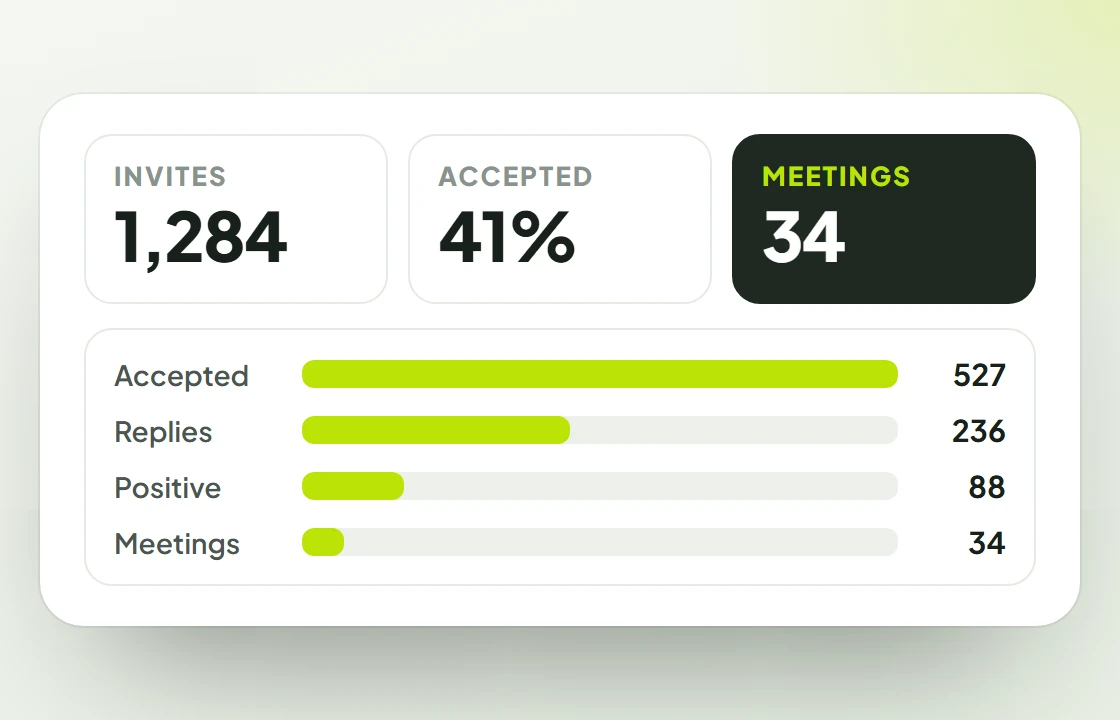
  6. The dashboard: invites, accept rate and meetings, with a funnel from accepted invites to meetings.06

    The problem

    No clear view of what's working.

    With ReacherPro

    The dashboard follows every campaign from invites to meetings, with reply rates, a campaign ranking and the replies that need you now.

Three ways to do outbound

By hand, by headcount, or by ReacherPro.

All three can book meetings. Here is what each one asks of your team.

Doing it by hand

Time per lead
Research, copy, paste and log, for every single lead.
Consistency
Depends on the day and on who has time.
Follow-up
Lives in reminders and spreadsheets. Easy to miss.
Personalisation
Good when there is time. Usually there isn't.
Cost
Looks free. Costs your team's selling hours.
Scale
Stops at what one person can type.

Hiring more SDRs

Time per lead
Still manual, now spread across more people.
Consistency
Varies from rep to rep, and with every new hire.
Follow-up
Each rep runs their own system.
Personalisation
Strong, if every rep researches every lead.
Cost
A salary, ramp-up time and management, per person.
Scale
Grows one hire at a time.

ReacherPro

Time per lead
A list from one search; messages written for you.
Consistency
The same sequence, the same pace, every day.
Follow-up
Automatic on LinkedIn and email, follow-ups stop on reply.
Personalisation
Every note, follow-up and email written from the profile.
Cost
$24.99–$29.99 per seat a month. No add-ons.
Scale
Add a seat: a LinkedIn account or an inbox.

Seat prices are per month on monthly billing: $29.99 on Team, $24.99 on Agency. A seat is one LinkedIn account or one email inbox.

Your first week

From sign-up to first replies.

No long onboarding project. Four steps, and the busywork moves off your team's plate.

  1. 1.Join and get set up

    Book a call with our team, then connect your seats: LinkedIn accounts and Gmail, Outlook or IMAP inboxes.

  2. 2.Your first lead list

    Paste a LinkedIn or Sales Navigator search, or upload a CSV. Duplicates and Do Not Contact entries are skipped.

    Read the guide
  3. 3.Your first campaign

    Start from a template or build the sequence, let the AI write the messages, set the send window and launch. It starts at a safe pace.

    Read the guide
  4. 4.Your first replies

    Answers arrive in Conversations with a push alert, the follow-ups stop for that lead, and your team takes it from there.

Book a call
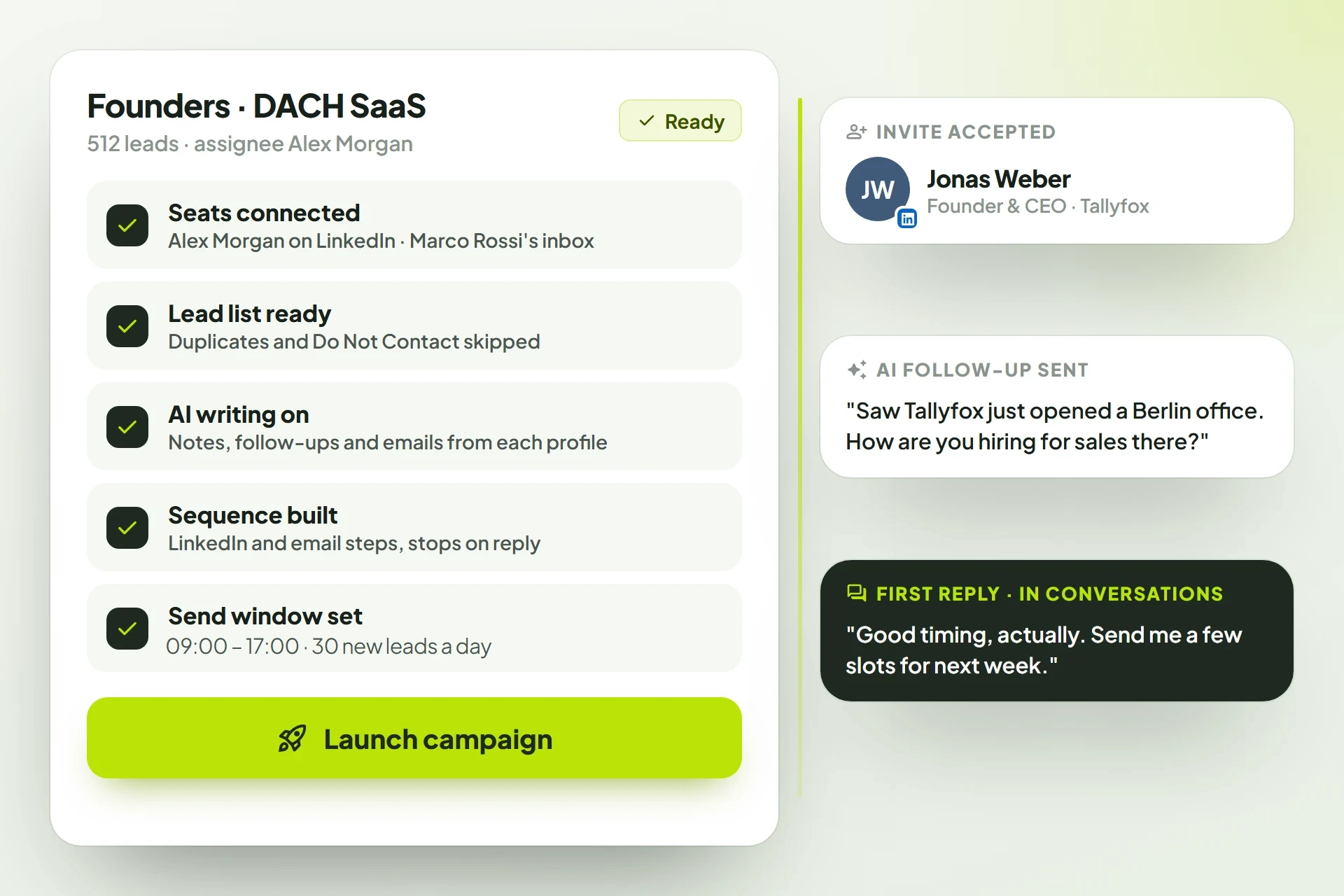
A campaign launch checklist with seats, list, AI writing, sequence and send window ready, beside the first accepted invite, AI follow-up and reply.

In their words

Less manual work, more real conversations.

ReacherPro has made our outreach far more organized. We build a campaign once and it handles the LinkedIn and email follow-ups for us, so our team spends less time on manual work and more time on real conversations.
Swiv logoTalha SaeedCEO, Swiv
“Having all our replies in one inbox has been a big improvement. We no longer switch between platforms, and the dashboard gives us a clear view of how our campaigns are performing each week.”
Branqor logoAzmat Ali, CEO, Branqor
“Setting up campaigns is straightforward, and the conditional steps make follow-ups feel natural instead of automated. ReacherPro has become a reliable part of our daily outreach routine.”
Scriblerr logoHassan Ali, CEO, Scriblerr

FAQ

Questions before you switch

What teams ask when deciding.

  • ReacherPro (also written Reacher Pro) is an AI SDR for B2B teams on LinkedIn and email. You build a lead list, design a branching sequence on a visual canvas, and let the AI draft each connection note, follow-up, InMail and email from the prospect's own profile. Replies land in Conversations, and your team takes over.

  • It supports them. ReacherPro handles list imports, sequence logic and first-touch drafting, and follow-ups hold off once a prospect replies. Your SDRs spend their time on real conversations instead of research and copy-paste.

  • Every campaign sends only on the days and inside the window you set, in its own timezone, and starts at most 45 new leads a day. LinkedIn accounts are paced within LinkedIn's limits, and each mailbox sends at most 50 emails a day, warming up automatically from 5 a day over its first 14 days. Follow-ups stop when someone replies, and if an account disconnects you are alerted right away.

  • No. Every plan includes every feature, on every seat. Any seat can connect a LinkedIn account or an email inbox — whichever you need — and every seat comes with its own AI credits each month (50 on Team, 100 on Agency). Many outreach tools charge extra for email inboxes and AI credits; ReacherPro doesn't.

Early access

Get in before
the doors open.

We're opening ReacherPro to teams in small batches. Join the waitlist and we'll bring you in as seats open.

  1. Early access as seats openTeams on the list are brought in first, a small batch at a time.
  2. A setup call with our teamWe build your first campaign with you, on your use case.
  3. No card, no commitmentJoining is free. You decide on seats once you're in.
Request early accessTakes under a minute. We reply by email.

We only use this to contact you about ReacherPro. Privacy policyProtected by reCAPTCHA; the Google Privacy Policy and Terms of Service apply.