Messaging4 min read
LinkedIn Connection Notes That Get Accepted
How to write a short LinkedIn connection note people actually accept — a simple structure, real before-and-after examples, and the mistakes to avoid.
 ReacherPro TeamProduct & growth
The connection request is the smallest piece of writing in outbound, and the one that decides whether anything else happens. If the invitation is ignored, the follow-up you spent an hour perfecting never gets sent.
A good note is not clever. It is short, specific, and gives the person one honest reason to say yes. This guide shows a structure that works, real examples of notes rewritten, and the mistakes that get invitations ignored.
Why the note matters
Most people decide on an invitation in a couple of seconds, from three things: your photo and headline, any connections you share, and the note. You can only fully control the note.
A generic note — or a pitch disguised as one — tells the reader exactly what will happen after they accept. A specific note tells them why they, in particular, are worth connecting with. That difference is what moves acceptance.
The three-part note
LinkedIn caps how long a note can be, so every word has to earn its place. The notes that work almost always have the same three parts:
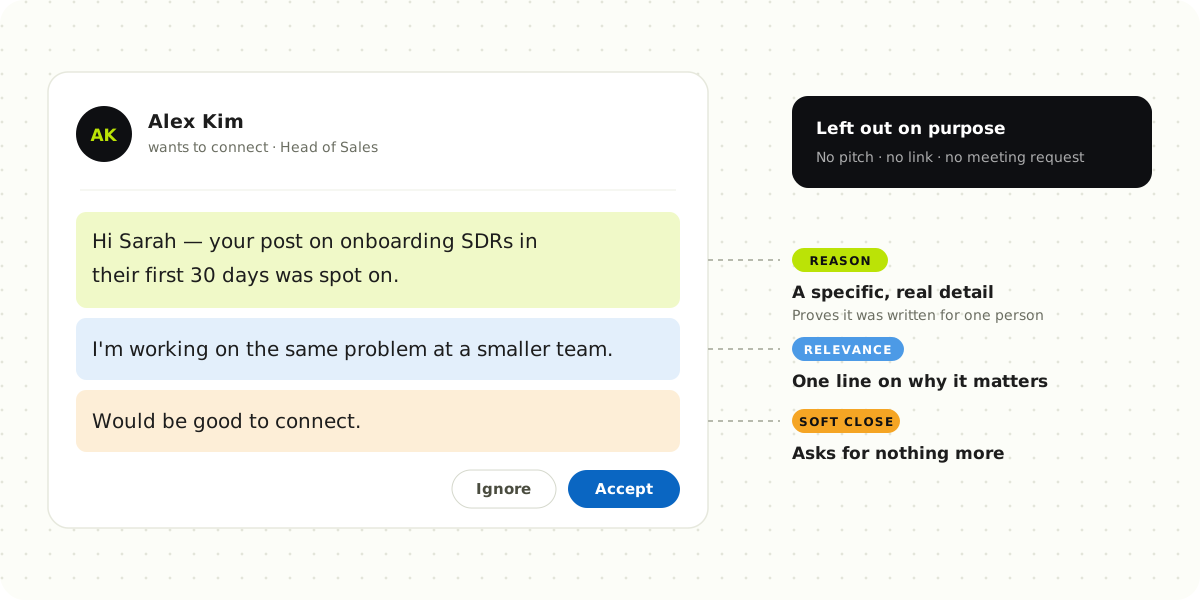
- A specific reason. Something real about them: a post they wrote, a project their team shipped, a role they just started. It proves the note was written for one person.
- Why it is relevant. One line connecting that reason to you — a shared focus, a problem you both work on, a question you genuinely have.
- A soft close. An easy, low-stakes line such as "would be good to connect". No meeting request, no link, no pitch.
Before and after
Here is what that looks like in practice. The prospects below are illustrative examples.
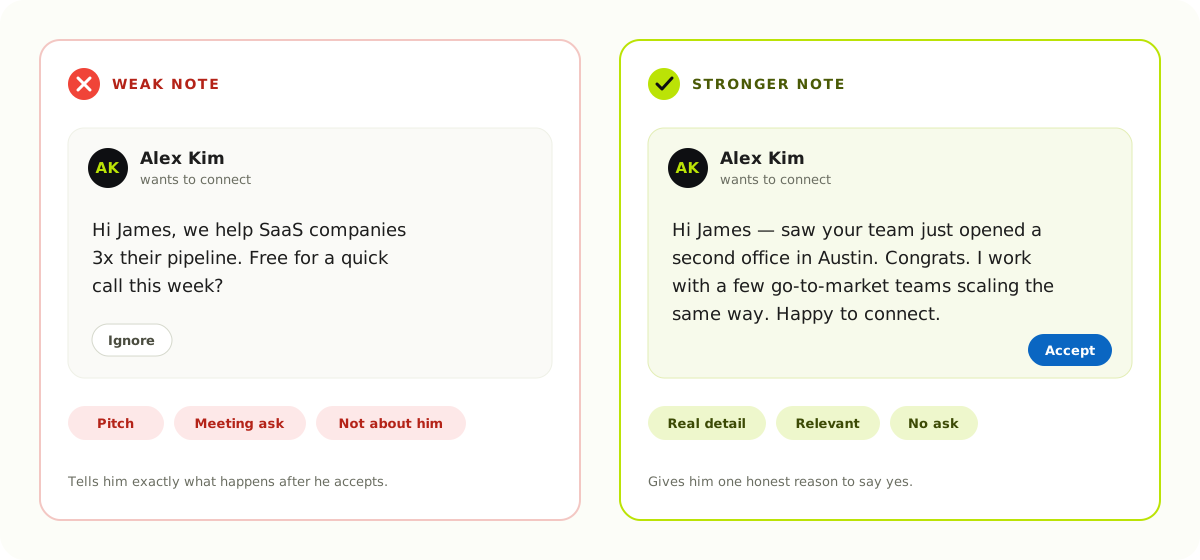
Three more rewrites, with what goes wrong in each:
| Weak note | Why it fails | Stronger note |
|---|---|---|
| "Hi Sarah, I'd love to add you to my professional network." | Says nothing about her; could be sent to anyone | "Hi Sarah — your post on onboarding SDRs in their first 30 days was spot on. I'm working on the same problem at a smaller team. Would be good to connect." |
| "Hi Priya, I noticed we're both in sales!" | "Personalisation" so broad it is meaningless | "Hi Priya — loved how you described your outbound process on the Revenue podcast last week. Would be great to follow your work." |
| "Hi Tom, please accept my request." | Asks for something and gives nothing back | "Hi Tom — we're both in the RevOps community and I've learned a lot from your threads on lead routing. Would be good to connect." |
Notice what the stronger notes have in common: a real detail, one line of relevance, and an ending that asks for nothing more than the connection.
Mistakes that get notes ignored
- Pitching in the invitation. The note's only job is the connection. Save the offer for after they accept.
- Fake familiarity. "Hope you're well!" from a stranger reads as automation, not warmth.
- Personalisation that is not personal. Their first name and company name are mail-merge fields, not research.
- Flattery without substance. "Impressive profile!" says nothing. Name the specific thing that impressed you.
- Asking for time. A meeting request in a first note is a bigger ask than most people will grant a stranger.
When to send no note at all
A blank invitation is sometimes the right call — for example when you share many mutual connections, already interacted with their content, or met them at an event. A note that adds nothing is worse than no note; a note that adds a real reason beats both.
What happens after they accept
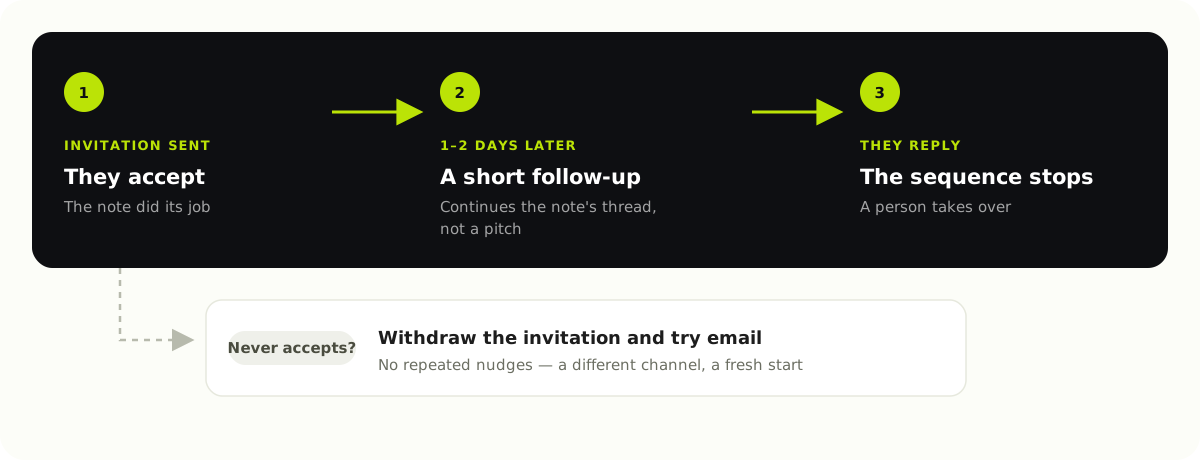
The note opens the door; the first follow-up is where the conversation starts. Send it a day or two after they accept, keep it short, and continue the thread the note started rather than switching to a pitch. If they reply at any point, stop the sequence and let a person take over.
If they never accept, do not keep nudging. Withdraw the invitation after a reasonable time and try a different channel — our guide to running LinkedIn and email in one sequence covers how.
A quick checklist
- Mentions one real, specific detail about the person
- Says in one line why that detail matters to you
- Ends softly, with no meeting request, link or pitch
- Reads naturally out loud, as if you would say it in person
- Fits comfortably inside LinkedIn's character limit
Writing notes at scale with ReacherPro
Writing a genuinely specific note for every prospect is exactly the part of outbound that does not scale by hand. ReacherPro's AI drafts each invitation note and follow-up from the prospect's own profile — their role, their company and what they have posted recently — so every note starts from a real detail. Your team reviews the tone instead of researching from scratch, and campaigns send at a steady, safe pace with daily limits on every seat. See every feature.
Short, specific and honest wins. Write the note you would want to receive.